Posted On December 28, 2025

How To Create Viral Short Videos Using AI

Ashna A 0 comments
>> AI Tools >> How To Create Viral Short Videos Using AI
Create Viral Youtube Shorts Using AI

Scrolling through YouTube Shorts is effortless, but creating Shorts that actually stop the scroll? That’s a whole different game. In just 60 seconds, you need a strong hook, tight pacing, and visuals that keep viewers locked in till the last frame — and doing all that consistently can get exhausting.

This is where AI changes everything. From generating scroll-stopping hooks to speeding up editing and repurposing long videos into high-performing Shorts, AI tools can cut hours of work down to minutes.

In this guide, I’ll walk you through a battle-tested workflow for creating viral YouTube Shorts using AI. the exact process creators are using to produce more content, faster, without burning out. Whether you’re just starting out or trying to scale your Shorts strategy, this tutorial will be of help.

How To Create YouTube Short Video (or any) Using AI

Let’s get into the process and how-to’s. You can skip Step 1 if you’ve already found your niche.

Step 1: Choose Your Niche (The Data-Driven Approach)

Choosing a niche is not just picking a popular topic; it’s about finding a sweet spot where many people are searching for information (High Demand), but few people are making content about it (Low Supply). AI YouTube SEO tools turn this selection process into clear steps based on data.

Broad Keyword Brainstorm & Tool Check:

Start by considering a broad topic you favor, such as “Personal Finance” or “Gaming.” You then enter this broad subject into the tool’s Keyword Explorer.
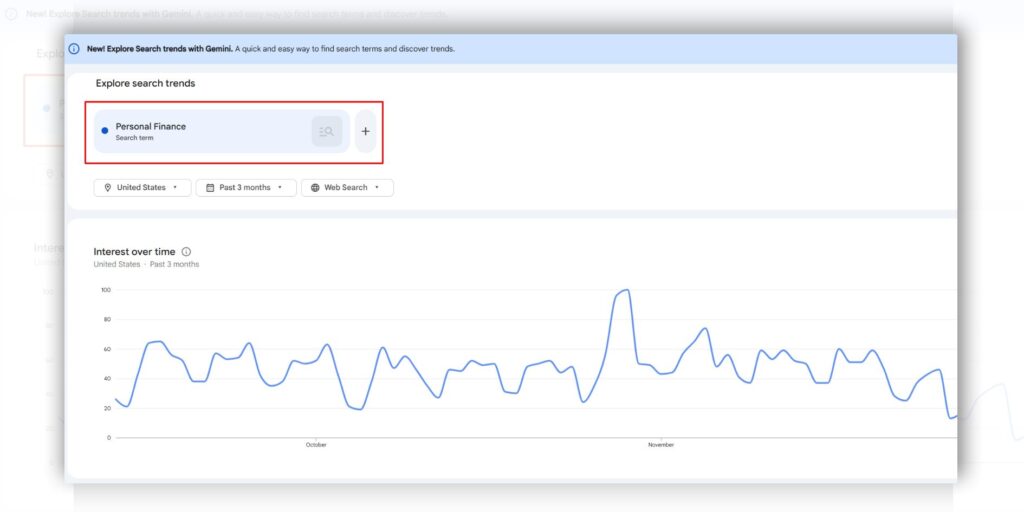
 

Google Trends Keyword ResearchImage Source: Google Trends

The tool will right away show you the search popularity (volume) and the difficulty of ranking for it (competition score).

A central tactic here is the High-CPM Check. Topics like Personal Finance or Digital Marketing often yield more money per view from advertisements (High CPM), making them better income choices even if they present some competition.

The Niche-Down Filter (Finding the Gap):

The next step is to find keywords that many people search for but don’t have much content. This is your main goal.

For instance, if you search the broad term “Fitness,” the competition is too intense. The AI tool will propose smaller, more focused subjects, such as “Keto meal prep for working parents” or “Mobility exercises for desk workers.”
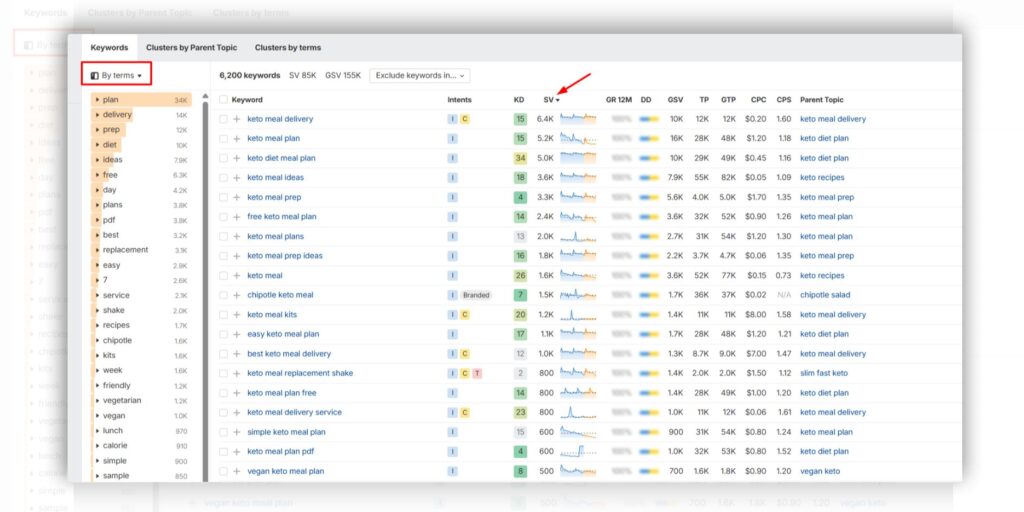
 

Ahrefs YouTube Keyword ResearchSource: Ahrefs

These specific phrases work better because they target a distinct audience, and the content space is less full.

Competitor & Trend Analysis (Validating the Niche):

After discovering a few suitable niche ideas, you must verify that the audience exists. Utilize the tool’s Competitor Analysis to watch channels already producing videos within your possible niche.
The Daily Ideas or Trending Topics function will point out particular videos that are currently gaining popularity within that topic area. This confirms audience interest.

For example, If a competitor’s leading video has reached many views, you know the niche holds promise, and you have a confirmed successful video idea to begin with. But make sure to not bring identical ones. Your content quality should top that of competitors for that research research & research a lot.


Content Calendar Generation:

Once you have located 20 to 30 great keyword ideas that are both sought-after and face low competition, it is time to get organized. You can use the tool’s internal planning feature or export all the data into a Google Sheet to develop your Video Content Calendar.

Group your keywords into monthly themes, for example, if its finance use ‘Holiday Budgeting Tips’ for November and ‘Year-End Tax Prep’ for December. These are just examples you can define the theme based on latest trend, seasonal trend or anything that fit within what the audience might find useful

This organized structure guarantees you always produce content that viewers are actively looking for.

Step 2: Write a Script for a Short Video

A great script is the blueprint for a successful short video. Since these videos are quick ( max 3 minute but 15-60s is highly recommended), every word must count.

The goal is to maximize audience attention immediately. This process can be made much faster using AI tools.


Create a New Script Using AI (ChatGPT, Gemini)

Use AI tools like ChatGPT or Gemini to create a strong first draft quickly. To get a good result, you must give the AI specific details. This is called prompt engineering.

 ChatGPT YouTube Shorts Prompt

Image Source: ChatGPT 

Learn from Competitors for Better Outputs

To write better scripts, look at what content is already succeeding.

  • Summarize Competitor Content: Find a highly ranked video in your niche. Use a summarizing AI tool, or ask ChatGPT or Gemini to analyze the video’s written transcript. Your goal is to understand the main ideas, how the video is put together, and which parts were popular.
  • Refine with ChatGPT: Take the summary you created and give it back to ChatGPT with a new command:

Using this competitor summary (paste summary here), write a completely new 50-second script. Cover the same main topics, but use a more surprising opening and simpler language. Keep the tone friendly.

This ensures your final script is based on proven success but is totally unique.

Create Shorts from Existing Long Videos

If you have long videos, you can save effort by learning how to create youtube shorts from existing videos.

  • Use the “Most Replayed” Feature: When viewing your video on YouTube, the progress bar shows a graph. High peaks on this graph mean viewers rewatched that section the most.
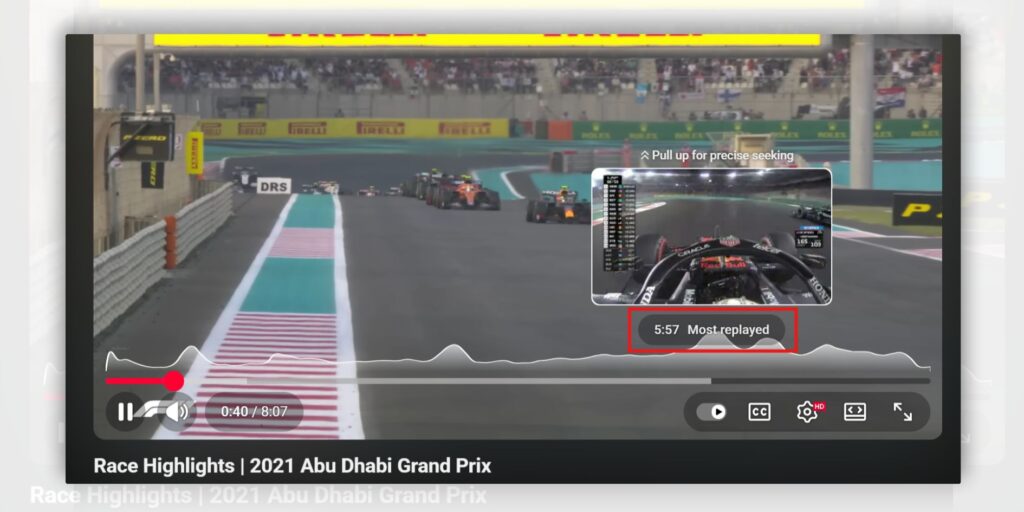
Most Replated Feature by Youtube

  • High spikes mean that part of the video was highly engaging. You can move along the timeline to find these exact moments, click the spike to jump straight to the popular clip. These specific, well-liked clips are perfect for cutting out and making a Short video.
  • Use Short as Hook to Your Long Form Video: Use these short clips as hooks to guide people to your main, longer content. For example, the short video can end with a line like, “Watch the full guide on how to build this on my channel!” This sends your short video audience to your longer videos, helping to grow your channel overall.

Step 3: Create and Edit Your Short Video Using AI Video Editors

Once your script is ready, AI tools help generate the voice, music, and the final video clips, making the video production stage simple and fast.

Audio Generation

If your video is faceless, you need a high-quality voiceover. Tools like ElevenLabs, which is one of the best AI voice generation tools, create a natural, human-sounding voice from your text. The process is straightforward: you go to the website, choose the Text-to-Speech area, paste your written script, and then select a voice from the library that matches the style you want. After you click “Generate,” the tool quickly creates the audio file.

A helpful tip is to use correct punctuation, like commas and periods, or add line breaks in your script. This controls the AI’s pacing and forces natural pauses, which makes the voiceover sound much more like a real person and less like a machine.

Background Music Generation

To find unique background music and avoid problems with copyright, use AI music tools like Suno.

The process involves going to the Suno website and writing a short prompt that describes the music you need, such as “Upbeat electronic music for a tech tutorial, 45 seconds long” or “Calm lofi beat, no singing.” The tool then generates a few unique, original songs based on your description.

If you use a paid account, the music is usually safe to use in your monetized videos without worrying about copyright claims. Always review the tool’s terms to confirm commercial usage rights.

Competitor & Trend Analysis (Validating the Niche):

After discovering a few suitable niche ideas, you must verify that the audience exists. Utilize the tool’s Competitor Analysis to watch channels already producing videos within your possible niche.
The Daily Ideas or Trending Topics function will point out particular videos that are currently gaining popularity within that topic area. This confirms audience interest.

For example, If a competitor’s leading video has reached many views, you know the niche holds promise, and you have a confirmed successful video idea to begin with. But make sure to not bring identical ones. Your content quality should top that of competitors for that research research & research a lot.


Use AI Video Editing Tools

These editing programs use AI to make the final assembly of your quick short video go quicker.

For InVideo, which is easy for new users, you often start by using the “Text to Video” feature; you paste your voiceover script, and the AI automatically selects suitable stock video clips, matches them to the words, and builds an initial version of the video.

You then only need to go into the editor to quickly replace any clips that don’t look right, add your final text, and choose the 9:16 vertical orientation before downloading.

How Long Can YouTube Shorts Be?

how long can youtube shorts be

And of course you can use your own clips instead of AI generated clips, modify your video with AI editing features & adding Visual Effects.

For Adobe Premiere Pro, the AI assists with expert editing: after importing your clips and audio, the “Speech-to-Text” feature creates an instant, timed written record of your voiceover.

You can then use Text-Based Editing to edit the video by simply highlighting and removing words or sentences in the written record, which automatically cuts the video and audio clips at the same time, making hand-cutting much quicker. You can also use tools like “Enhance Speech” to clean up background noise automatically.

Step 4: Use Scheduling Tools to Post to YouTube

To stay consistent and ensure your Shorts are posted at the best time, you should use scheduling tools instead of uploading them by hand. This helps keep up a regular content routine that matches with your content calendar, which the YouTube platform values.

You can do this right through YouTube’s own controls or by using outside software.

Scheduling through YouTube Studio

The easiest way is to use the platform’s own free controls. Whether you use the computer version of YouTube Studio or the YouTube App on your phone, the actions are nearly identical.

When you upload your Short, you fill in the title, description, and tags. Under the “Visibility” option, do not pick “Public.” Instead, choose “Schedule.” You then set the exact date, time, and time zone for when you want the video to appear.

Once you confirm the set time, the video will automatically go live at that specific moment, even if you are away.

Using Third-Party Scheduling Tools

For creators who handle many channels or post to other sites (like TikTok and Instagram Reels), outside programs such as Buffer, Hootsuite, or TubeBuddy give more features. These programs let you schedule many Shorts at once, use one calendar to look at your content across several social media accounts, and often give better data reports.

For instance, some tools check your audience information and suggest the “Best Time to Publish” your Short, raising the chance of it getting quick attention and being shown to more people. This kind of planning makes sure your content reaches your audience when they are most engaged.

Conclusion

Making short videos is now an automatic process that can be repeated easily. By applying AI tools, you can move from finding a good niche and writing content to creating voiceovers, custom music, and editing all quickly and correctly.

Using these AI actions helps creators maintain a high output of quality videos. Consistency, supported by publishing tools, is the final part that changes automated content creation into audience growth.

Ashna Antony

Ashna Antony is a Hubspot Certified Content Marketer interested in the AI and SaaS landscape. A former Software Developer turned writer, she breaks down how tech actually works and why it matters. She writes about Generative AI, AI Tools, Website Builders, and SaaS. When she’s AFK, she’s probably adding songs to a Spotify playlist or halfway through a podcast episode.

DP

Related Post

Best AI Headshot Generators in 2026

Chances are you or your organization need a professional headshot, but booking a photographer feels…

Top Google Gemini Prompts for Realistic and Romantic Couple Photoshoots

Whether you want cute candid couple pictures, or elegant dinner-date style shots, Gemini AI can…

Best Free Generative AI Tools For 2026

If you’re looking to create content, images, music, or videos without spending a lot, free…