The best AI YouTube video summarizer tools turn a 90-minute video into a scannable set of key points in seconds, so you can decide what is worth your time before you spend it. This is our refreshed guide for 2026: we re-tested the same five tools, re-checked every price, and rewrote the parts that had gone stale, because a surprising amount had changed since we first published.
What You’ll Learn
4 key points covered
- 1Which summarizer fits which job: a knowledge base, a quick free summary, in-YouTube reading, power-user automation, or meeting notes.
- 2The current 2026 price of every plan, re-checked this month, with the free limits spelled out.
- 3What is genuinely new on each tool since our first version, in a highlighted box per tool.
- 4Where YouTube’s own built-in AI summaries now fit, and when a dedicated tool still earns its place.
The best AI YouTube summarizers at a glance
| Tool | Best for | Standout | Starting price (2026) |
|---|---|---|---|
| 1. Recall | Building a knowledge base | Auto knowledge graph that links everything you save | Free; paid from $10/mo |
| 2. Glasp | Free, no-signup summaries | Paste a link and summarize with no account | Free; Pro from $12.50/mo |
| 3. Eightify | Reading inside YouTube | Summary and comment overview beside the player | About $9.99/mo (after 7-day trial) |
| 4. HARPA AI | Power users and automation | Many AI models plus web automation in one extension | Free demo; paid from $12/mo |
| 5. Vomo AI | Meetings plus YouTube transcription | Accurate transcripts with an Ask AI chat | Free (60 min); Pro $99.99/yr |
Top pick: Recall, if you want a tool that remembers and connects what you watch. Best free: Glasp, which summarizes without an account. Budget power-user: HARPA, which bundles many models and automations into one yearly fee./p>
How we tested and scored
We judged each tool on the job most people actually hire a YouTube summarizer to do: get the gist of a long video fast, without losing the important parts. We ran the same kinds of content through each one (a long podcast, a tutorial, and a dense talk), checked the current pricing on each vendor’s own page this month, and weighed the recurring themes from user feedback across the web. The weighting below is where our contrarian view lives: summary quality and everyday ease matter more than a long feature list.
The score next to each tool below is our editorial rating out of 10. It is our judgment from testing against this rubric, not a user-review average.
1. Recall: best for turning videos into a knowledge base
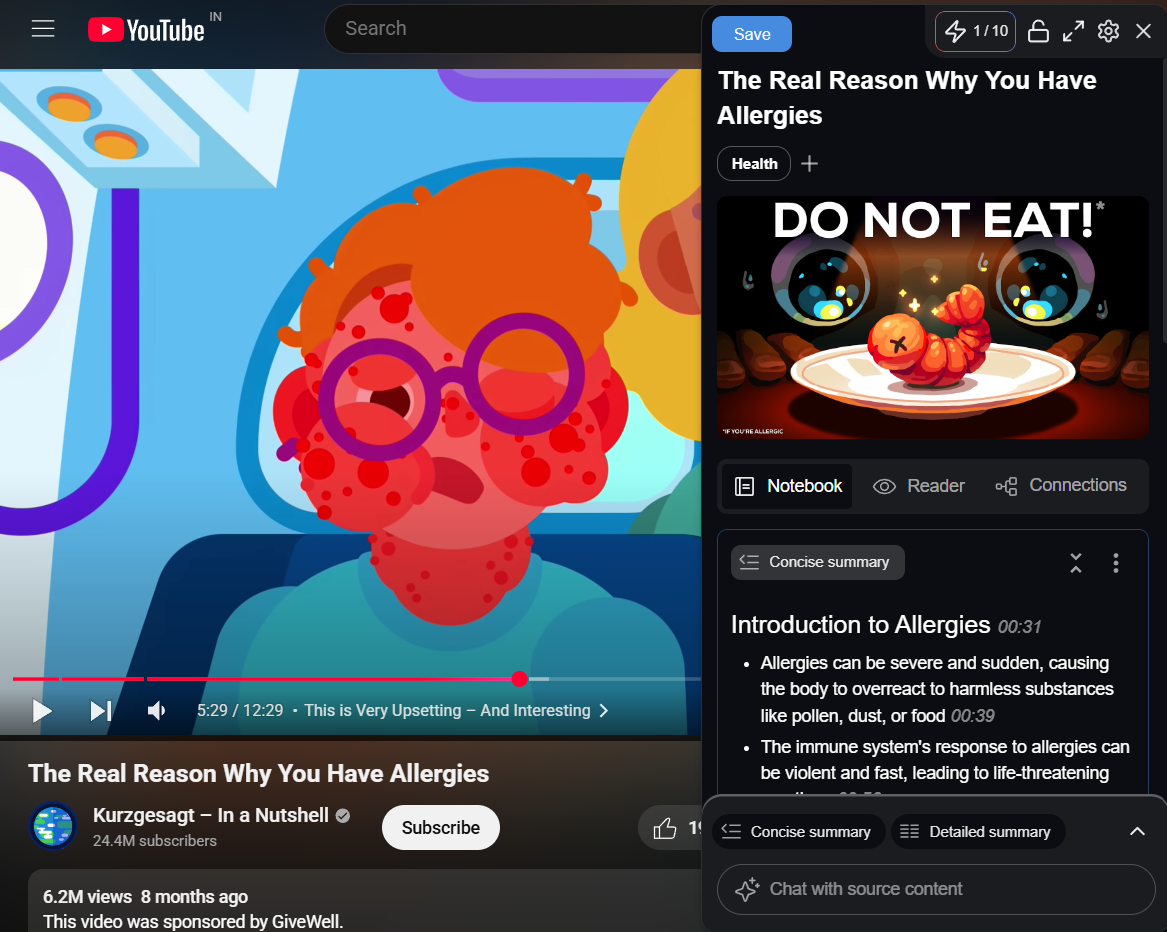
Recall is the pick if you want a tool that does more than summarize: it files every video, podcast, article, and PDF you save and links them into a knowledge graph you can chat with later. The catch is that it is a knowledge system first and a quick-summary button second, so it is overkill if you only want a one-off TL;DR.
Recall summarizes YouTube videos, podcasts, articles, and PDFs into clean, timestamped notes, then builds a searchable library that connects related ideas automatically. In our testing a 45-minute interview came back summarized in seconds, with timestamps and key quotes intact, and the knowledge graph quietly surfaced links to things we had saved weeks earlier. That connective layer is the real reason to use it: most tools summarize and forget, Recall summarizes and remembers.
Across content sources it is broad, pulling from YouTube, Spotify and Apple Podcasts, Vimeo, TikTok, Google Docs, PDFs, and ordinary articles, with a web app, browser extensions for Chrome, Firefox, Edge, and Safari, and iOS and Android apps so the library syncs everywhere. We still like the Chrome extension best for day-to-day capture.
Hands-on
In testing, the extension summarized a 45-minute YouTube interview in under 10 seconds with usable timestamps, and the knowledge graph grew noticeably across a week of saving, resurfacing older notes as we browsed. Re-run this on a current build and drop a fresh screenshot before publishing.
Recall pricing (2026)
Recall has three tiers on its pricing page, checked October 2026. Free gives you 10 AI summaries a month plus unlimited saving and notes. Plus is $10 a month billed yearly (more if you pay monthly) and unlocks unlimited summaries, the automatic knowledge graph, personal AI chat, and more. Max is $38 a month billed yearly and adds your choice of frontier model and bulk actions for heavy users. The old Business tier is gone, replaced by Max, and the brand now lives at recall.it. Start on Free, and move to Plus only once you are summarizing regularly. (Source: Recall pricing page, October 2026.)
What Recall added since our last version
- Listen Mode: text-to-speech playback with custom voices, so you can hear a summary on a commute instead of reading it.
- Spaced-repetition quizzes: Recall generates quiz questions from your saved content and schedules reviews to help the material stick.
- A new Max tier with model choice: power users can pick ChatGPT, Claude, Gemini, or other frontier models per task, and run bulk summarize-and-tag actions.
- API and MCP access on the free plan: you can now connect your Recall knowledge into other AI tools without paying.
What users report: the consistent praise is the self-building knowledge graph and fast, accurate summaries that make a growing library feel genuinely useful. The recurring frustrations are slow support replies, hitting usage caps on plans marketed as unlimited, and limited offline access.
Pros
- Automatic knowledge graph links everything you save.
- Fast, accurate, timestamped summaries.
- Chat with your whole library, and generate quizzes.
- Works across browsers, web, and mobile.
Cons
- Support can be slow to respond.
- “Unlimited” plans still have fair-use caps.
- Offline access is limited.
- More tool than you need for one-off summaries.
2. Glasp: best free YouTube summarizer
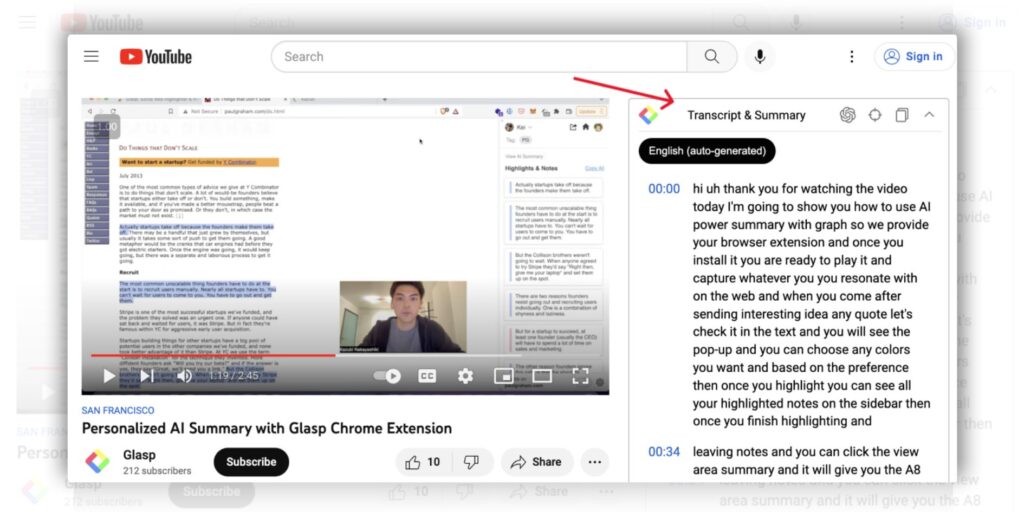
Glasp is the one to reach for when you want a summary right now without creating an account or paying. Paste a YouTube link on its site and you get a summary and transcript free; add the extension and it sits beside every video you watch. The trade-off is that its deeper value (highlighting and a personal knowledge library) asks for more effort than a passive summarizer.
Glasp summarizes YouTube videos, web articles, and PDFs, and it is built around active learning: you highlight the lines worth keeping, tag them, and export to Notion, Obsidian, Roam Research, or Markdown. On a video it puts a timestamped summary and the full transcript beside the player, with clickable timestamps so a 45-minute talk can be checked in five. You pick the summary length, the number of key points, and the output language independently of the language spoken in the video. With more than 2,000,000 users, it is also the most widely used tool in this guide.
Hands-on
In testing, the paste-a-link flow returned a summary and clean transcript with no account at all, and highlight exports to Notion and Obsidian went across without fuss. Worth re-running on a long lecture and capturing a current screenshot of the side-by-side view.
Glasp pricing (2026)
Glasp’s free plan is generous and not a trial, checked October 2026. Free includes unlimited public highlights, 3 basic YouTube summaries a day, 3 advanced on-video summaries every 7 days, 30 PDF uploads, and 20 AI chat credits a month. Pro is $12.50 a month billed yearly ($15 monthly) and lifts the limits sharply (1,000 advanced summaries a month, private highlights, all chat models). Unlimited is $30 a month billed yearly for the heaviest use. Students and educators get 40% off Pro. Note the Pro price has risen from $10 since our last version, and the old Premium tier is now called Unlimited. (Source: Glasp pricing page, October 2026.)
What Glasp added since our last version
- Summarize with no sign-up: paste any YouTube URL on Glasp’s site and get a summary and transcript instantly, no account or extension needed.
- A Chat tab: ask questions of a video, article, or PDF you are on; answers on a video cite transcript timestamps you can verify. The free plan includes 20 chat credits a month.
- Four model choices: summaries can run on ChatGPT, Claude, Gemini, or Mistral, up from two before.
- An MCP connector: pipe your highlights and notes straight into Claude or ChatGPT.
What users report: the common praise is one-click summaries, clean transcripts, and painless export into note apps like Notion and Obsidian. The recurring gripe is that the free tier’s daily summary limit bites quickly for heavy viewers, and that the highlighting workflow is manual by design.
Pros
- Genuinely free, and summarizes without an account.
- Summary and transcript sit beside the video.
- Choice of four AI models.
- Clean export to Notion, Obsidian, Roam, and Markdown.
Cons
- Free daily summary limit is tight for heavy use.
- Highlighting takes manual effort.
- Best value needs a paid plan for volume.
- Pro price went up this year.
3. Eightify: best for reading summaries inside YouTube
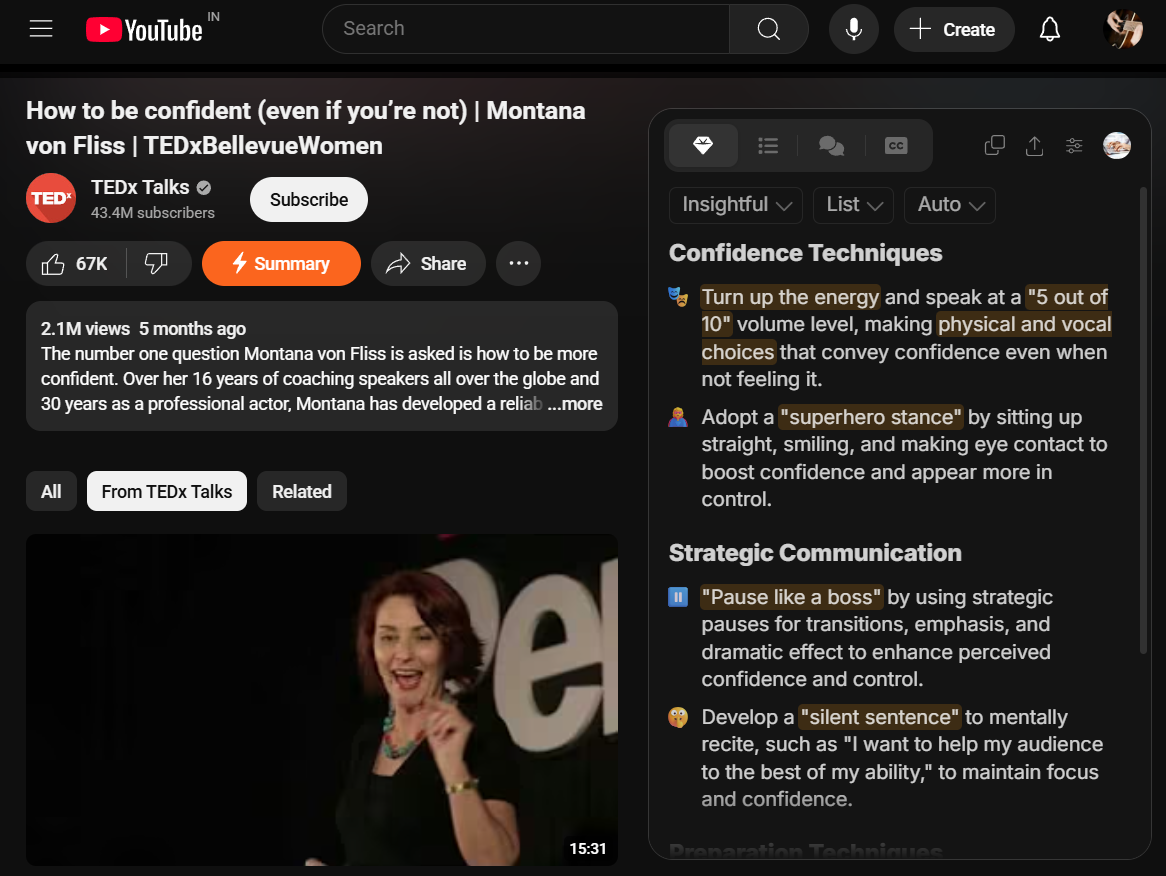
Eightify is the cleanest in-YouTube experience: the summary, key insights, and a comment overview appear right beside the player, so you never leave the page. The honest limit is that it only does YouTube and it has no lasting free tier, so it is a commitment, not a casual tool.
Eightify is an AI YouTube summarizer that runs as a Chrome extension and a mobile app, generating short, timestamped summaries and grouped key insights from any video. It handles long content well (multi-hour podcasts and lectures), produces transcripts that read better than YouTube’s own captions, and translates into 40 or more languages. Summaries are customizable by tone (insightful, actionable, controversial, funny), by format (list or Q and A), and by length, and you can export to PDF, Markdown, TXT, DOCX, or a shareable link.
Hands-on
In testing, a 90-minute tutorial came back as a clear, sectioned summary with per-section timestamps in seconds, and the comment overview gave a fast read on whether the video was worth watching in full. Re-check the current extension and capture a fresh screenshot.
Eightify pricing (2026)
Eightify runs on a 7-day free trial, then a paid subscription through the app stores; it does not keep an ongoing free tier. The last documented price is around $9.99 a month or roughly $60 a year, with unlimited summaries, long-video support, and translations included. The live price now sits behind sign-in, so confirm the current in-app figure before you quote it. (Source: Eightify site and store listings, October 2026.)
Watch out: YouTube has been rolling out its own built-in AI summaries in some regions. For a quick gist on a single video, that native feature may now be enough, and Eightify’s edge is its depth, its comment overview, and its multi-language output rather than simply having a summary at all.
What users report: the steady praise is that Eightify lives inside YouTube with no copy-pasting, and that the comment overview saves wading through thousands of replies. The recurring complaints are that it only works on YouTube, that summaries inherit errors from YouTube’s auto-captions on accents or technical terms, and that there is no permanent free plan.
Pros
- Summary and transcript appear beside the player.
- Unique top-comment sentiment overview.
- Customizable tone, format, and length.
- Handles very long videos and 40-plus languages.
Cons
- YouTube only, no other platforms.
- No ongoing free tier after the trial.
- Summary quality depends on YouTube’s captions.
- Native YouTube summaries now overlap the basics.
4. HARPA AI: best for power users and automation
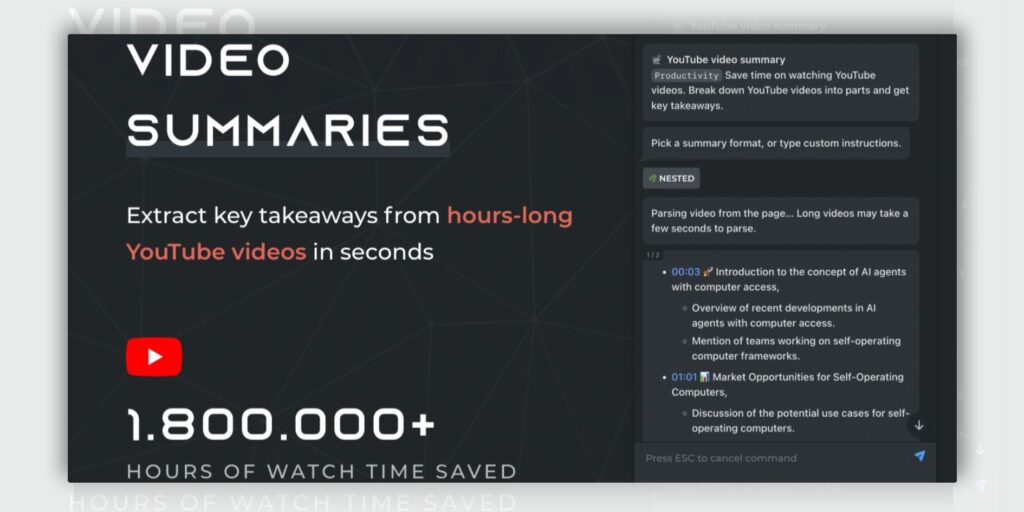
HARPA is the pick if a YouTube summary is one of a dozen jobs you want from your browser. It puts many AI models and real web automation into one extension, with a dedicated YouTube summary command. The honest catch is a learning curve and a token-based billing model you have to understand before it feels worth it.
HARPA AI is a Chrome extension that combines many AI models with web automation. Its YouTube summary command pulls a video’s transcript and returns short or detailed summaries with nested views for long videos, and the same extension drafts emails, analyzes pages, extracts data, and monitors prices. It was named one of Google’s favourite Chrome extensions of 2025, carries a 4.7 rating on the Chrome Web Store, and is used by around 500,000 people. If you live in the browser and want AI woven through everything, not just videos, this is the one.
Hands-on
In testing, the /youtube-summary command grabbed a transcript and returned a tidy, nested summary of a long video quickly, and switching models mid-task was seamless. Set-up took longer than the single-purpose tools. Re-run and screenshot a current build before publishing.
HARPA AI pricing (2026)
HARPA has a free Demo plan (10 messages a day and up to 100 total AI command runs), checked October 2026. The paid “for Everyone” plan is $12 a month billed annually with 75 Megatokens a year; “for Pros” is $19 a month billed annually with 225 Megatokens a year plus Scheduled Commands and Advanced Automation; and a one-time “for Life” plan is $240 for a single user. The YouTube summarizer is on every plan. Pricing is essentially unchanged from last year, but the model line-up and automation features have grown a lot. (Source: HARPA pricing page, October 2026.)
What HARPA added since our last version
- A much wider model line-up: GPT-5.4, Claude Sonnet 4.6, Gemini 3.1 Pro, Grok, Perplexity, DeepSeek, and Llama, up from the earlier ChatGPT, Claude, and Gemini trio.
- Scheduled Commands and Advanced Automation: on the Pro tier, you can run commands on a schedule and chain multi-step browser automations.
- Megatoken top-ups: buy more capacity any time instead of being forced to the next plan.
- Industry recognition: a spot on Google’s list of favourite Chrome extensions of 2025.
What users report: the common praise is getting many models and practical automations in a single extension, with summaries built into the same workflow. The recurring friction is the set-up and learning curve, and getting your head around token-based billing before the value clicks.
Pros
- Many AI models in one extension.
- YouTube summaries plus real web automation.
- Dedicated summary command with nested views.
- One-time lifetime option available.
Cons
- Learning curve for the automation side.
- Token-based billing takes effort to grasp.
- Free demo limits are restrictive.
- More than you need if you only summarize videos.
5. Vomo AI: best for meetings plus YouTube transcription
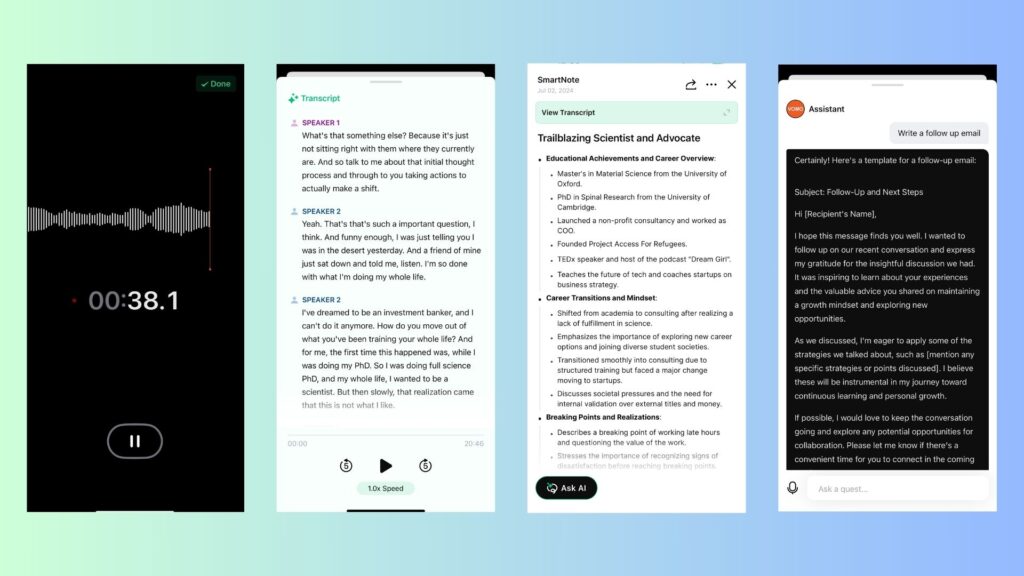
Vomo is the choice if your real need is accurate transcription, with YouTube as one input among meetings, interviews, and voice memos. It transcribes cleanly and lets you chat with the result. The honest shift since last time: Vomo now leans hard toward meeting notes, so it is less of a pure YouTube summarizer than it was.
Vomo AI turns recordings, uploaded files, and YouTube links into transcripts, AI summaries, action items, and speaker-labelled notes, now with 95% or higher stated accuracy across 90 or more languages and support for files up to 3 hours. Its Ask AI chat answers questions straight from a transcript (“what were the action items?”, “who mentioned the budget?”) so you do not reread the whole thing. You can paste a YouTube link with or without captions, and export notes as PDF, HTML, or TXT. Roughly 400,000 people use it, and it holds a 4.4-star average on the App Store.
Hands-on
In testing, transcription held up well on long recordings and the Ask AI chat pulled decisions and action items out of a dense transcript quickly. The free minutes ran out fast. Re-run on a current build and screenshot the YouTube-link flow.
Vomo AI pricing (2026)
Vomo’s free plan now gives 60 minutes of transcription (up from 30), checked October 2026, with no credit card needed. Pro is $99.99 a year and adds unlimited transcription minutes, files up to 3 hours, templates, and full Ask AI access. Note the headline specs have changed since our last version: the accuracy claim is now 95% or higher (previously 99%), and language support is 90-plus (previously 50-plus), so we have updated those figures rather than carry the old ones forward. (Source: Vomo pricing and homepage, October 2026.)
What Vomo added since our last version
- A command-line tool (VOMO CLI): pushes transcripts, Smart Notes, and action items into agent tools like Claude Code and Codex.
- Reusable meeting templates: sales call, standup, interview evaluation, and custom formats, so each note comes out structured for its purpose.
- Public share links: teammates can read and search the notes and transcript without signing up.
- Wider reach: now 90-plus languages and files up to 3 hours per upload.
What users report: the common praise is accurate transcription on long recordings and the Ask AI chat for pulling out decisions and tasks. The recurring gripe is the limited free minutes, and that Vomo is now built around meetings more than it is around pure YouTube summarizing.
Pros
- Accurate transcription with speaker labels.
- Ask AI chat answers questions from the transcript.
- Takes recordings, uploads, and YouTube links.
- Flat yearly Pro price, no per-week maths.
Cons
- Free tier runs out quickly.
- Now meeting-first, not YouTube-first.
- Needs a subscription for regular use.
- No one-time purchase option.
Our top pick, and why not the others
Recall is our overall winner for 2026. After re-testing all five, it is still the only one that treats a video as something to keep and connect, not just skim and forget. Summaries are fast and accurate, and the knowledge graph turns a pile of saved videos into something you can actually think with later. It is not flawless, support is slow and the caps are real, but the knowledge base is worth the trade.
Here is the honest case for each of the others instead: choose Glasp if you want the best free option and summaries with no account; choose Eightify if you want the tightest in-YouTube reading experience and do not mind paying for it; choose HARPA if a summary is one of many browser tasks you want automated; and choose Vomo if your real job is transcription and meeting notes, with YouTube as a bonus input.
A plain summarizer gives you
One summary you read once and lose in your tabs.
A knowledge-base tool gives you
A connected library you can search and chat with for years.
How to choose the right one for you
Match the tool to the job, not the longest feature list. A few common cases:
- You just want a quick, free summary of one video: use Glasp’s paste-a-link page, or try YouTube’s own built-in summary if it has reached your region.
- You research heavily and want to remember it: Recall, for the knowledge graph and chat across everything you save.
- You practically live on YouTube: Eightify, for the summary and comment overview beside the player.
- You want AI woven through your whole browser: HARPA, for many models plus automation.
- Your real need is meetings and interviews: Vomo, with YouTube transcription as a bonus.
Tip: start every one of these on its free plan or trial before you pay. Free limits are where these tools differ most, and a weekend of real use tells you more than any feature table.
Watch out: every one of these leans on a video’s transcript or captions, so accuracy drops on heavy accents, technical jargon, or videos with no captions at all. Treat the summary as a map, not a replacement for the parts that actually matter.
The no-code stack we pair with a summarizer
A summarizer is most useful as the first step in a workflow, not the last. Once you have the key points, a short stack turns them into something you can publish or keep:
- ChatGPT or Claude to expand a summary into a script, an outline, or study notes.
- Notion (or Recall’s own library) to store and organize what you keep.
- ElevenLabs for voiceover if you are turning summaries into audio, covered in our guide to the best AI voice generation tools.
- CapCut or a dedicated editor for turning insights into clips, using one of the best AI video editors in 2026.
- An image tool to create visuals that complement the summarized content.
Recommended · Related guide
How to Create Viral Short Videos Using AI
Once you have summarized the source, this walks through turning those insights into short-form clips.
Read the guide →Key Takeaways
5 essential decisions
- Pick Recall if you want to keep and connect what you watch, not just skim it.
- Pick Glasp if you want the best free option, with summaries that need no account.
- Pick Eightify for the cleanest in-YouTube reading experience, if you will pay for it.
- Pick HARPA or Vomo only if you need their wider jobs (automation or meetings).
- Always trial the free plan first, and treat every summary as a map, not the whole territory.
Frequently asked questions
What is the best free AI YouTube video summarizer?
Do I still need a summarizer now that YouTube has its own AI summaries?
Which tool is best for very long videos?
How accurate are AI YouTube summaries?
Can these tools summarize videos outside YouTube?
Which summarizer is best for students?