You probably landed on this page because you need a tool to quickly get the essence of YouTube videos without spending hours watching them. No judgment here, I’m right there with you. As a content creator I too have amassed over 1,000+ videos saved under the guise of “I’ll watch this later, learn from it eventually.”
Honestly, who has the time to watch videos that run 10, 15, or even 20 minutes in their entirety anymore? Our attention spans crave quick, actionable insights.
So in this blog I’ve researched and tested the best AI-powered YouTube video summarizer tools that condense lengthy videos into bite-sized summaries. These tools are game changers for content creators, solopreneurs, and students alike anyone who wants to save time while staying informed.
I’m sharing my top 5 video summarization tools, including the standout product I personally recommend. Plus, I’ll reveal my favorite no-code tool bundle that pairs perfectly with these summarizers for better workflows
📝 Key Notes on our Research Process (for Transparency)
- Included free to premium tools for all user budgets
- Analyzed summarizer accuracy with diverse YouTube video categories
- Invested 100+ testing hours across multiple tools and features
- Reviewed ease of setup, interface usability, and support quality
- Tested integrations with no-code tools and content workflows
Most Popular AI Youtube Video Summarizer Tools (Paid and Free)
- Recall AI: Have the Best Intuitive Chrome Extension
- Eightify: Fast, flexible YouTube video summaries
- Vomo AI: Smart Meeting & Youtube Summarizer Tool
- Glasp AI: Free highlighting and transcript extraction tool
- HARPA AI Chrome Extension: AI-powered browser assistant for video summarization
1. Recall AI: Have the Best Intuitive Chrome Extension

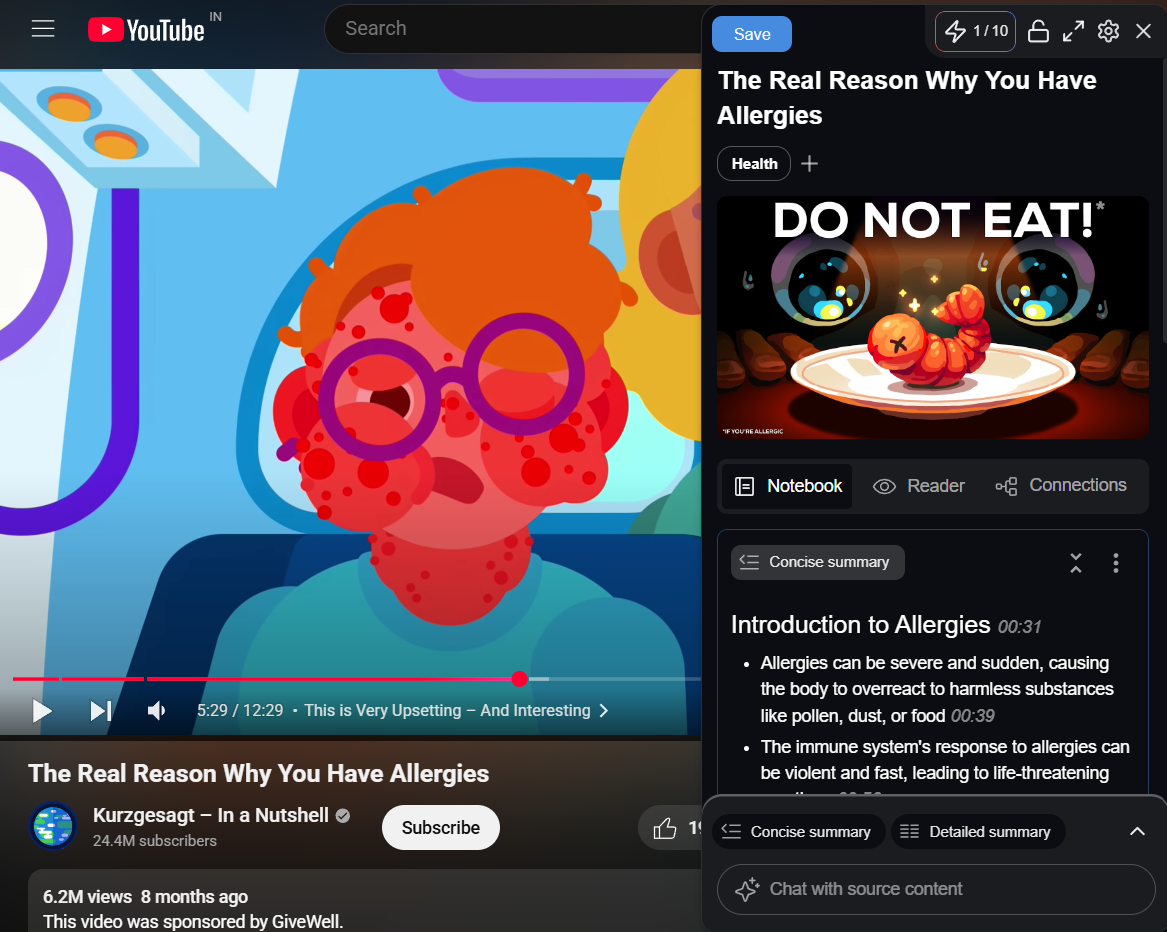
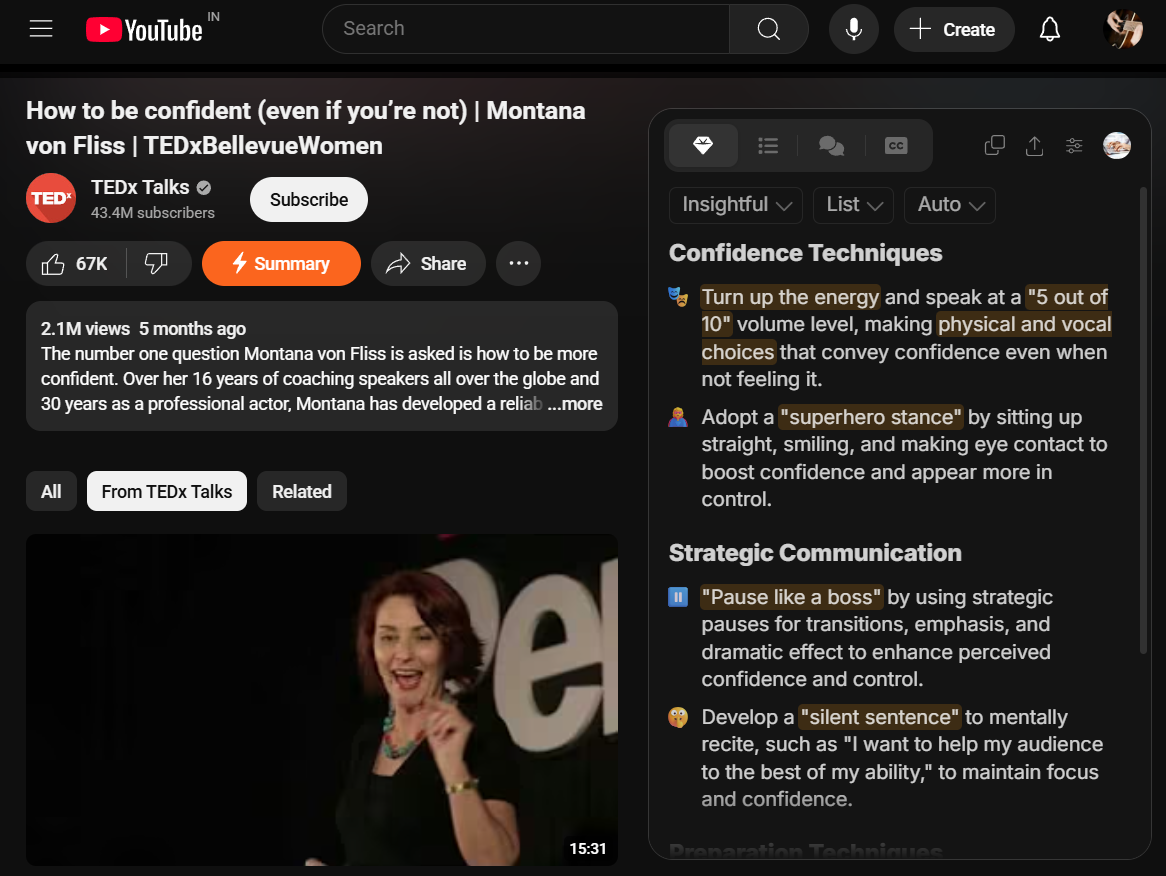
Recall is a powerful AI-driven video summarizer that transforms how you consume and retain online content. This browser-based tool automatically converts YouTube videos, podcasts, articles, and PDFs into clean, organized summaries while building a searchable knowledge base that grows smarter over time. With its instant summarization capabilities and unique knowledge graph connections, Recall helps you extract key insights from hours of content in just seconds.
The platform stands out by automatically organizing your saved content into topic-based categories and connecting related information through an intelligent knowledge graph.
When I tested the tool over several weeks, I was impressed by how it identified key concepts and linked them to other content in my library, creating a web of interconnected knowledge that helped me discover relationships between ideas I might have otherwise missed.
Watching the knowledge graph grow daily has been genuinely fascinating – you start seeing patterns and connections you never noticed before. Kudos to whoever had the idea to bring this feature.
✅ Pros
❌Cons
- Instant accurate video summaries
- Self-organizing knowledge base
- automatically
Chat with saved content - Works across multiple devices
- Generates learning quiz questions
- Limited offline storage access
- Weak customer support response
- Usage caps despite unlimited plans
✅ Pros
- Instant accurate video summaries
- Self-organizing knowledge base
- automatically
Chat with saved content - Works across multiple devices
- Generates learning quiz questions
❌Cons
- Limited offline storage access
- Weak customer support response
- Usage caps despite unlimited plans
How Much Does Recall AI Cost?
Recall offers three tiers:
- Recall Lite (Free) – 10 monthly summaries and chats
- Recall Plus ($7/month annually, $10 monthly) – unlimited summaries, knowledge graph, and Augmented Browsing.
- Recall Business – custom pricing for teams with good security and deployment options.
Best Subscription Plan Recommended for Recall AI
We recommend starting with the free Lite plan to test core features, then upgrading to Plus for $7/month annually if you regularly consume educational content. The Plus plan’s unlimited summaries and Augmented Browsing justify the cost for active learners.
Stand Out Feature of Recall AI:
Recall’s standout feature is Augmented Browsing, which automatically highlights keywords on web pages that connect to content in your knowledge base. When I read new articles or watched videos – related concepts from my saved summaries appeared as clickable highlights, creating real-time connections between new and existing knowledge.
This local-first feature processes information on your device for privacy while displaying the number of connections through a browser widget. During my testing, I found myself discovering connections between topics I had saved weeks apart, which completely changed how I approached research and learning.
You can navigate through these connections using arrows or create new summaries directly from the highlighted content.
Should You Use Recall AI for Youtube Summarization?
Yes I recommend to atleast trying it. In my daily usage, I found the Chrome extension to be incredibly responsive – I was able to summarize a 45-minute YouTube interview in under 10 seconds, complete with timestamps and key quotes. The platform integrates with popular content sources including YouTube, Spotify podcasts, Apple Podcasts, PDFs, Google Docs, Vimeo, TikTok, and various article formats.
The tool provides cross-platform accessibility through web applications and beta mobile apps for iOS and Android, ensuring your knowledge base syncs across all devices. Although I personally loved the Chrome extension they provide.
Recall AI is recommended for 👍
Not recommended for 👎
- Students researching multiple topics
- Content creators gathering insights
- Professionals managing educational content
- Users who want modern, aesthetic design options
- Businesses that need to integrate with third-party apps or software
Recall AI is recommended for 👍
- Instant accurate video summaries
- Self-organizing knowledge base
- automatically
Chat with saved content - Works across multiple devices
- Generates learning quiz questions
not recommended for 👎
- Limited offline storage access
- Weak customer support response
- Usage caps despite unlimited plans
2. Eightify: Fast, flexible YouTube video summaries
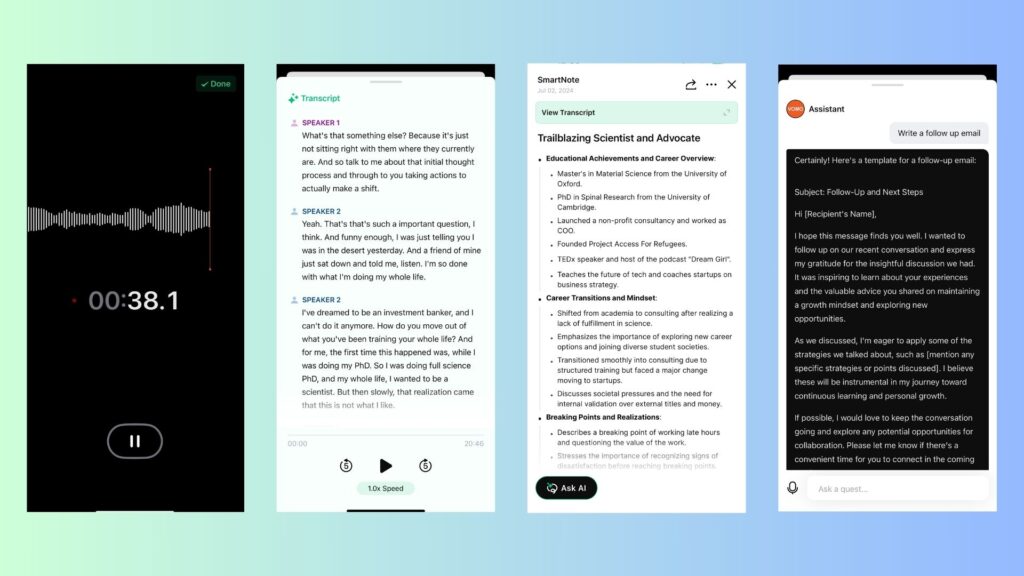
Eightify is an AI YouTube summarizer available as a Chrome extension and mobile app that generates short, high-quality summaries and key insights from videos to save time on long content. When I tested it, I could get a clear, detailed summary of a 90-minute tutorial in seconds, complete with timestamps for each section.
It supports timestamped navigation, key insights grouping, and full transcripts that can outperform built-in YouTube captions.
Summaries are customizable by tone (insightful, actionable, controversial, funny), format (list or Q&A), and length, with options for titles, emojis, and grouping. Exports and sharing are built in, including PDF, Markdown, TXT, DOCX, and shareable links. It works in 40+ languages and handles long videos up to 10 hours.
✅ Pros
❌Cons
- Accurate, concise video summaries.
- Timestamped navigation for quick jumps.
- Customizable tones and formats.
- Translations into 40+ languages
- Variety of Export Options
- YouTube-only, no other platforms.
- No ongoing free tier.
- May miss nuanced context.
✅ Pros
- Accurate, concise video summaries.
- Timestamped navigation for quick jumps.
- Customizable tones and formats.
- Translations into 40+ languages
- Variety of Export Options
❌Cons
- YouTube-only, no other platforms.
- No ongoing free tier.
- May miss nuanced context.
How Much Does Eightify Cost?
Eightify offers a 7‑day free trial on Chrome, then a subscription via app stores. Pricing is $9.99/month or $59.99/year with in‑app purchases on iOS, and includes unlimited summaries, long‑video support, translations, and more.
Best Subscription Plan Recommended for Eightify
Choose the annual plan if summarizing weekly or more; the effective monthly rate is lower than paying month‑to‑month and covers unlimited summaries and long videos after the 7‑day trial.
Stand Out Feature of Eightify:
Eightify’s Top Comments Overview surfaces key audience reactions alongside summary insights, helping quickly assess sentiment without reading thousands of comments, and it supports customizable insight “focus” types (insightful/actionable/controversial/funny) and formats (list or Q&A) for different tasks.
Should You Use Eightify for Youtube Summarization?
Eightify is a strong pick for quickly skimming long YouTube videos, especially podcasts, lectures, and tech/business content where timestamped insights, upgraded transcripts, and comment overviews save time. Note that it’s YouTube‑only, relies on AI (may miss nuance), and requires a subscription after the trial, with data collection disclosed per store policies.
Eightify is recommended for 👍
Not recommended for 👎
- Researchers and students on deadlines
- Professionals triaging long videos
- Multilingual users across devices
- Non‑YouTube video sources
- Those needing human‑level nuance
- Free‑only or trial‑only users
Eightify is recommended for 👍
- Researchers and students on deadlines
- Professionals triaging long videos
- Multilingual users across devices
not recommended for 👎
- Non‑YouTube video sources
- Those needing human‑level nuance
- Free‑only or trial‑only users
3. Vomo AI: Smart Meeting & Youtube Summarizer Tool

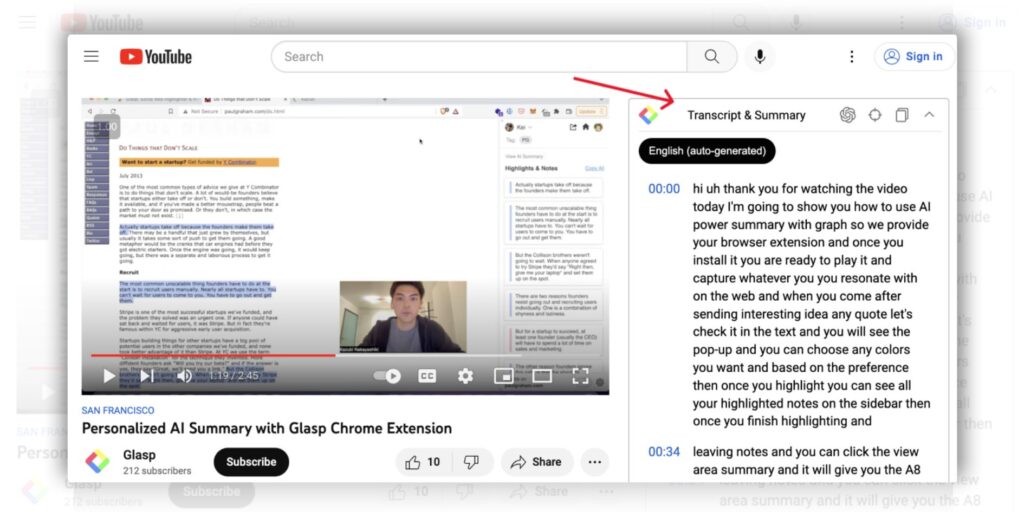
Vomo AI transforms voice recordings into accurate text using OpenAI’s Whisper v3 technology, delivering 99% transcription accuracy across 50+ languages. The platform excels at meeting transcription and voice memo conversion, featuring automatic speaker identification and intelligent summarization.
They have a chat feature called “Ask AI”, powered by GPT-5 and Claude 4.1 Sonnet, lets users chat with their transcripts to extract key insights, generate action items, and create follow-up content.
AI chat is handy for quickly getting important points without re-reading entire transcripts (Get Recall too has this option). Vomo supports direct recording, file uploads, and YouTube link transcription.
✅ Pros
❌Cons
- Uses advanced Whisper v3 transcription engine
- Supports over 50 languages with accuracy
- Interactive AI chat with transcript content
- Unlimited transcription length on Pro plans
- Automatic speaker identification and Smart Notes
- Limited free tier (30 minutes only)
- No desktop app, web beta only
- Requires subscription for regular use
✅ Pros
- Uses advanced Whisper v3 transcription engine
- Supports over 50 languages with accuracy
- Interactive AI chat with transcript content
- Unlimited transcription length on Pro plans
- Automatic speaker identification and Smart Notes
❌Cons
- Limited free tier (30 minutes only)
- No desktop app, web beta only
- Requires subscription for regular use
How Much Does Vomo AI Cost?
Vomo AI offers a Free plan with 30 minutes of transcription and a Pro plan at $1.92/week (yearly billing) or $7.99/week (monthly). Both plans include 99% accuracy transcription, speaker identification, Smart Notes generation, and Ask AI chat features.
Pro users get unlimited transcription minutes and exclusive web beta access. When I compared the limits, the unlimited Pro plan is clearly for power users who need regular transcriptions.
Best Subscription Plan Recommended for Vomo AI
For most people, the Pro yearly plan at $1.92/week is the best deal because it gives unlimited transcription and full feature access without breaking the bank. The free tier is great to try, but I quickly ran out of minutes during testing, so for serious use, Pro is necessary.
Stand Out Feature of Vomo AI:
One of the newest features I liked is Vomo’s improved Chapter UI and audio playback, which make navigating long transcripts much easier. Plus, the YouTube link transcription that automatically creates AI-based notes from videos saves lots of time when analyzing content. These upgrades feel like small but meaningful quality-of-life improvements for regular users.
Should You Use Vomo AI for Video Summarization?
If you need accurate meeting transcription plus the ability to interact with your transcript content using AI, Vomo AI is a solid choice. Just keep in mind the free tier is quite limited, so it’s best if you’re ready for a subscription commitment. The Ask AI chat is a unique bonus that really helped me get more from each transcript without extra effort.
Vomo AI is recommended for 👍
Not recommended for 👎
- Professionals conducting frequent meetings regularly
- Students transcribing lectures and interviews
- Content creators analyzing YouTube videos
- Casual users needing occasional transcription
- Teams requiring advanced collaboration features
- Users preferring one-time purchase software
Vomo AI is recommended for 👍
- Professionals conducting frequent meetings regularly
- Students transcribing lectures and interviews
- Content creators analyzing YouTube videos
not recommended for 👎
- Casual users needing occasional transcription
- Teams requiring advanced collaboration features
- Users preferring one-time purchase software
4. Glasp AI: Free highlighting and transcript extraction tool
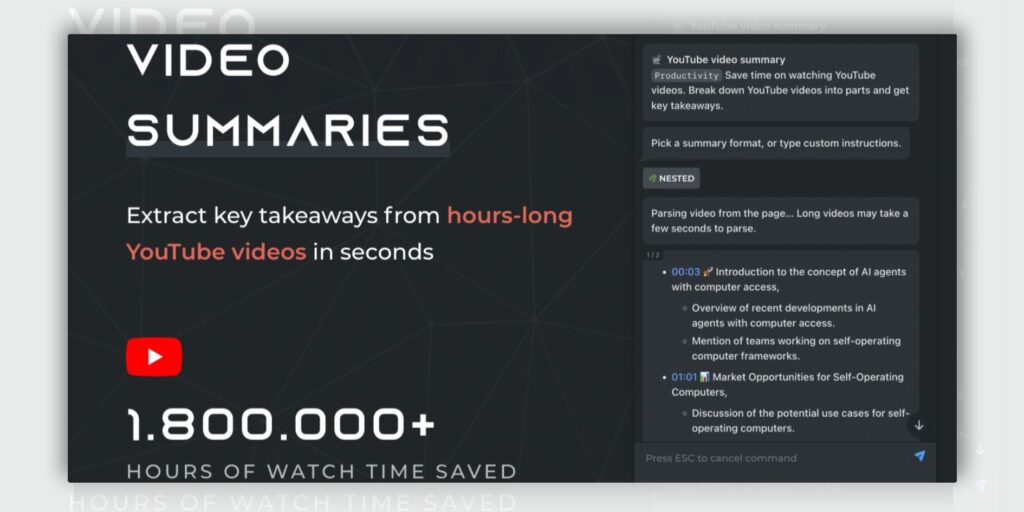
Unlike other summarization tools, Glasp focuses on active learning through highlighting and note-taking. When I first tried it, I was impressed by how it extracted video transcripts in multiple languages and let me highlight key sections with different colors.
You can organize your highlights with tags, and the extension integrates with popular AI models like ChatGPT and Claude to generate summaries. In my testing, I was able to export my highlights to note-taking apps like Notion, Obsidian, and Roam Research in various formats without any hassle.
✅ Pros
❌Cons
- One-click video summarization available
- Multi-language transcript support offered
- Timestamped summaries with highlights
- Export to multiple note-taking apps
- Social media sharing capabilities
- Limited to browser extension only
- Works best with shorter videos
- Requires manual highlight organization
✅ Pros
- One-click video summarization available
- Multi-language transcript support offered
- Timestamped summaries with highlights
- Export to multiple note-taking apps
- Social media sharing capabilities
❌Cons
- Limited to browser extension only
- Works best with shorter videos
- Requires manual highlight organization
How Much Does Glasp AI Cost?
Glasp offers three tiers:
Free (3 YouTube summaries/day, ~5 PDF files),
Pro for $10
USD/month (1,000 advanced summaries/month, 100 PDFs, private highlights, Notion sync).
Premium for $25 USD/month (5,000 summaries/month, unlimited PDFs, priority support).
The free tier felt quite limited for heavy YouTube users, but it’s perfect for testing the waters.
Best Subscription Plan Recommended for Glasp AI
I’d recommend the Pro plan for serious learners. The free tier’s 3-summary daily limit becomes frustrating quickly, while Premium feels excessive unless you’re processing hundreds of videos monthly.
Stand Out Feature of Glasp AI:
Glasp’s standout feature is its ability to highlight video transcripts directly while watching, creating a personalized knowledge base.
Users can find relevant ideas based on their highlight patterns, making it easier to connect concepts across different videos. This active learning approach sets it apart from passive summarization tools.
Should You Use Glasp AI for Video Summarization?
After testing Glasp for several weeks, I’d say it’s ideal for learners who prefer active engagement over passive consumption. However, keep in mind that it requires manual highlighting effort and works best with educational content. When I used it for entertainment videos, it felt like overkill. The tool is perfect for building a personal knowledge repository from YouTube videos.
Glasp AI is recommended for 👍
Not recommended for 👎
- Students taking online courses regularly
- Researchers collecting video-based information
- Content creators studying competitors
- Users wanting fully automated summaries
- People consuming entertainment content primarily
- Those preferring mobile-only video consumption
Glasp AI is recommended for 👍
- Students taking online courses regularly
- Researchers collecting video-based information
- Content creators studying competitors
not recommended for 👎
- Users wanting fully automated summaries
- People consuming entertainment content primarily
- Those preferring mobile-only video consumption
5. HARPA AI Chrome Extension: AI-powered browser assistant for video summarization

HARPA AI is a Chrome extension that combines AI capabilities with web automation, making it easy to summarize YouTube videos and web content quickly. When I first tried it, I noticed how smoothly it integrates multiple AI models like ChatGPT, Claude, and Gemini right into my browser, there was no need to jump between apps.
Beyond just video summaries, it also helped me draft emails, analyze SEO, extract data, and automate tasks like price monitoring. The extension runs locally, which made me feel comfortable about my privacy since none of my data was stored externally.
Its YouTube summary feature instantly pulls transcripts and gives options for short or detailed summaries, saving me lots of time.

✅ Pros
❌Cons
- Built directly into browser tabs
- Supports multiple AI models easily
- Practical pre-set automations included
- Accurate summarization and data extraction
- Well-organized prompt library available
- Requires API setup for full features
- Free plan limits can be restrictive
- Some learning curve for automation use
✅ Pros
- Built directly into browser tabs
- Supports multiple AI models easily
- Practical pre-set automations included
- Accurate summarization and data extraction
- Well-organized prompt library available
❌Cons
- Requires API setup for full features
- Free plan limits can be restrictive
- Some learning curve for automation use
How Much Does HARPA AI Cost?
HARPA AI offers a free demo plan with 10 messages/day and basic automations. The S1 plan costs $12/month (billed annually) with 75 Megatokens/year. S2 is $19/month for 225 Megatokens/year and advanced automation. A lifetime plan is $240, single user only, with 30 starting Megatokens.
Best Subscription Plan Recommended for HARPA AI
Based on features and value, S1 ($12/month, billed annually) is best for most users. It gives unlimited commands, predefined editing, generous tokens, and is cost-effective, unless team use or high volume is critical.
Stand Out Feature of HARPA AI:
One feature I found especially useful is HARPA’s /youtube-summary command. It quickly grabs and summarizes a video’s transcript, allowing nested views for longer videos and highlighting key takeaways. It made digesting long content much faster for me without losing important points.
Should You Use HARPA AI for Video Summarization?
If you’re willing to spend a little setup time configuring API keys and exploring commands, HARPA AI is worth it. Just be prepared for the learning curve and note that the free plan is quite limited. It fits best for users like me who want AI integrated smoothly into their browser workflow for tasks beyond simple summarization.
HARPA AI is recommended for 👍
Not recommended for 👎
- Content creators and researchers
- Marketing professionals
- Productivity-focused browser users
- If you want plug-and-play simplicity
- Casual users without setup patience
- If no API access or budget constraints
HARPA AI is recommended for 👍
- content creators and researchers
- marketing professionals
- productivity-focused browser users
not recommended for 👎
- if you want plug-and-play simplicity
- casual users without setup patience
- if no API access or budget constraints
Which is the Best Youtube Summarizer? Our Top Pick 👑
After testing all five tools extensively, Get Recall is the GOAT, though it wasn’t without its quirks. As a vivid PC user for content research, Get Recall’s Chrome extension genuinely surprised me. I summarized a 2-hour podcast in seconds, and the knowledge graph feature? Mind-blowing.
What sold me wasn’t just the speed, but how it automatically connects your saved content. Recall builds this growing web of interconnected knowledge that actually helps you discover patterns you’d miss otherwise.
Their customer support is frustratingly slow, and despite claiming “unlimited” plans, you’ll hit usage caps. The offline access is also pretty limited compared to what VOMO AI offers. But honestly, the knowledge base feature alone makes these drawbacks bearable.
If you’re someone who consumes tons of content and wants a tool that actually learns with you rather than just summarizing, Get Recall is worth the investment just don’t expect perfect customer service when issues arise.
The No-Code Tool Bundle I Rely On with Get Recall (Personally Vetted)
You would typically combine Get Recall with these tools in a workflow designed to maximize insight extraction and content repurposing:
- ChatGPT for refining and expanding summaries into engaging scripts or notes
- Notion or an equivalent knowledge management app to store and organize summaries from Get Recall
- ElevenLabs for voiceover generation if turning summaries into audio content
- CapCut or InVideo for quick video editing when repurposing summaries into clips or creating youtube shorts videos
- Midjourney or DALL·E for creating visual content to complement summarized videos
From my own testing, Get Recall shines when paired with transcript tools like Tactiq and GPT-4o, creating a robust stack that not only summarizes but lets you build deeper insights and multimedia output efficiently. The personal knowledge base that Get Recall offers is a game-changer for managing large volumes of summarized videos.
Janez Martin
Janez Martin is an ecommerce enthusiast from Slovenia, specializing in AI tools, the Shopify platform, and dropshipping strategies. She has previously worked as an Ecommerce Solutions Consultant, helping brands streamline operations and scale online. When she’s not exploring new tools or optimizing stores, Janez enjoys taking peaceful evening walks.